
Step-by-step replay in the Recorder
You can now set a breakpoint and replay a user flow step by step in the Recorder panel.
To set a breakpoint, click on the blue dot next to a step. Replay your user flow, the replay will pause before executing the step. From here, you can continue the replay, execute a step, or cancel the replay.
With this feature, you can fully visualize and debug your user flow with ease.
See Recorder features reference for more information.

Chromium issue: 1257499
Support mouse over event in the Recorder panel
The Recorder now supports adding a mouse over (hover) step manually in a recording.
This demo shows a pop up menu on hover. Try to record a user flow and click a menu item.
If you replay the user flow now, it will fail because the Recorder doesn’t capture mouse over events automatically during recording. To resolve this, add a step manually to hover over the selector before clicking the menu item.

Chromium issue: 1257499
Largest Contentful Paint (LCP) in the Performance insights panel
LCP is an important, user-centric metric for measuring perceived load speed. You can now find out the critical paths and root causes of a Largest Contentful Paint (LCP).
In a performance recording, click on the LCP badge in the Timeline. In the Details pane, you can view the LCP score, learn how to fix resources that slow down the LCP and see the critical path for the LCP resource.
See Performance Insights to learn how to get actionable insights and improve your website’s performance with the panel.

Chromium issue: 1326481
Identify flashes of text (FOIT, FOUT) as potential root causes for layout shifts
The Performance insights panel now detects flash of invisible text (FOIT) and flash of unstyled text (FOUT) as potential root causes for layout shifts.
To view the potential root causes of a layout shift, click on a screenshot in the Layout shifts track.
See Optimize WebFont loading and rendering to learn the technique to prevent layout shifts.
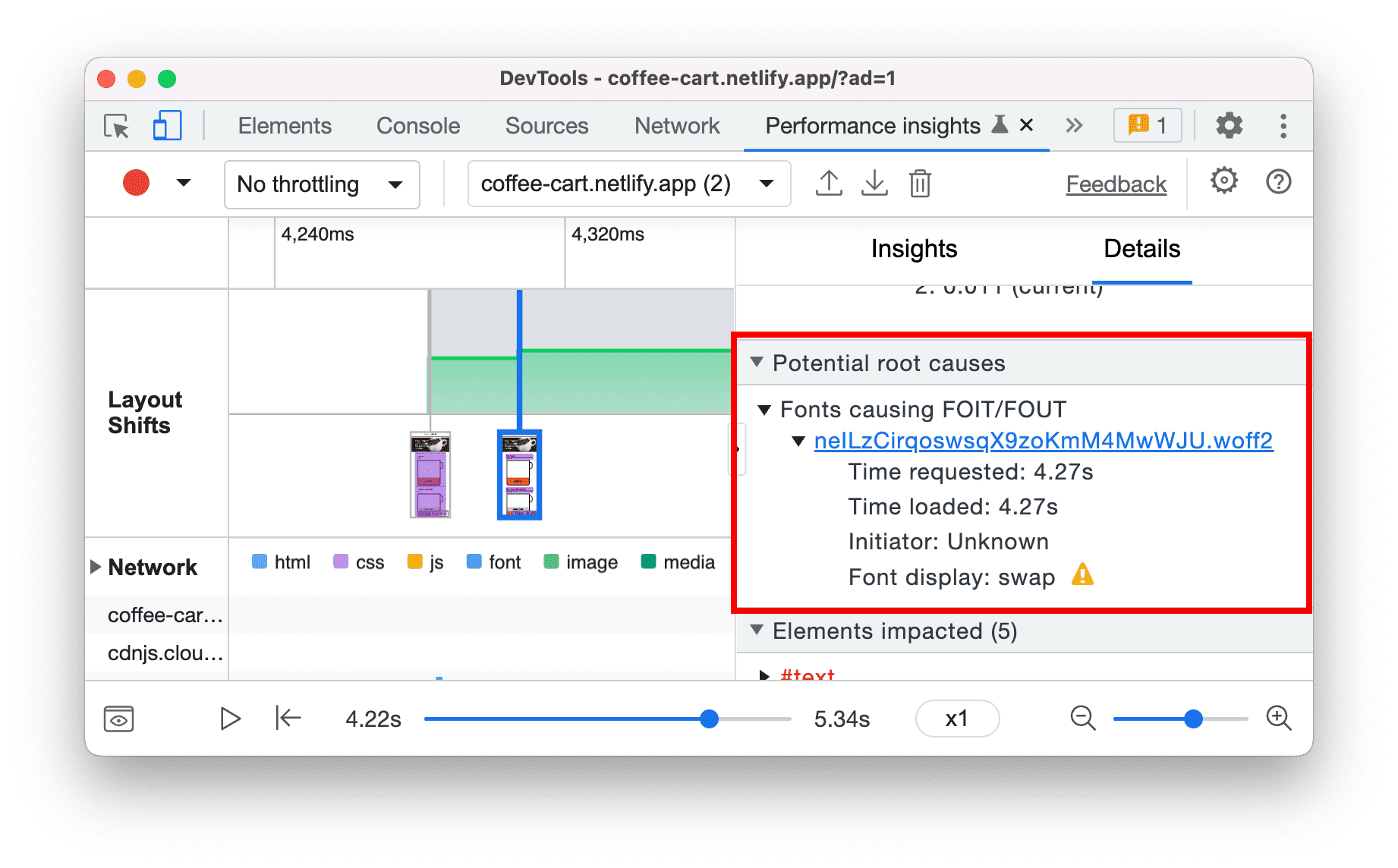
Chromium issues: 1334628, 1328873
Protocol handlers in the Manifest pane
You can now use DevTools to test the URL protocol handler registration for Progressive Web Apps (PWA).
The URL protocol handler registration lets installed PWAs handle links that use a specific protocol (e.g. magnet, web+example) for a more integrated experience.
Navigate to the Protocol Handlers section via the Application > Manifest pane. You can view and test all the available protocols here.
For example, install this demo PWA. In the Protocol Handlers section, type “americano” and click Test protocol to open the coffee page in the PWA.

Chromium issues: 1300613
Top layer badge in the Elements panel
Use the top layer badge to understand the concept of the top layer and visualize how the top layer content changes.
The <dialog> element has recently become stable across browsers. When you open a dialog, it is put into a top layer. Top level content renders on top of all the other content.
In this demo, click Open dialog.
To help visualize the top layer elements, DevTools adds a top layer container (#top-layer) to the DOM tree. It resides after the closing </html> tag.
To jump from the top layer container element to the top layer tree element, click the reveal button next to the element or its backdrop in the top layer container.
Next to the top layer tree element (for example, the dialog element), click the top-layer badge to jump to the top layer container.

Chromium issue: 1313690
Attach Wasm debugging information at runtime
You can now attach DWARF debugging information for wasm during runtime. Previously, the Sources panel only supported attaching source maps to JavaScript and Wasm files.
Open a Wasm file in the Sources panel. Right-click in the editor and select Add DWARF debugging info… to attach debugging information on demand.
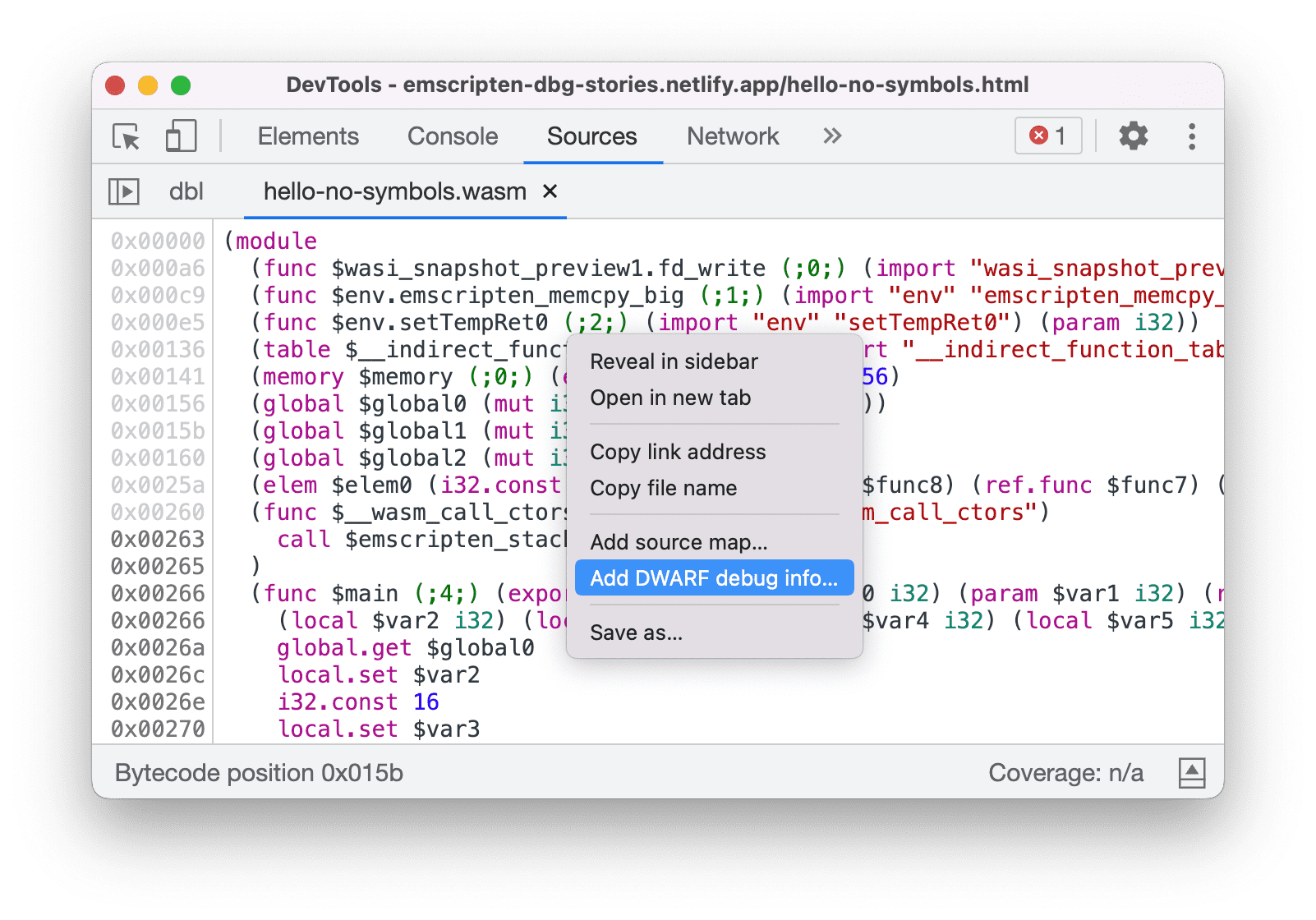
Chromium issue: 1341255
Support live edit during debugging
You can now edit the top-most function on the stack without restarting the debugger.
In Chrome 104, DevTools brings back the restart frame feature. However, you weren't able to edit the function you are currently paused in. It is common for developers to break in a function and then edit that function while paused.
With this update, the debugger automatically restarts the function with the following restrictions:
- Only the top-most function can be edited while paused
- No recursive call on the same function further down the stack

Chromium issue: 1334484
View and edit @scope at rules in the Styles pane
You can now view and edit the CSS @scope at-rules in the Styles pane.
The @scope at rules is part of the CSS Cascading and Inheritance Level 6 specification. These rules allow developers to scope style rules in CSS.
Open this demo page and inspect the hyperlink within the <div class=”dark-theme”> element. In the Styles pane, view the @scope at-rules. Click the rule declaration to edit it.
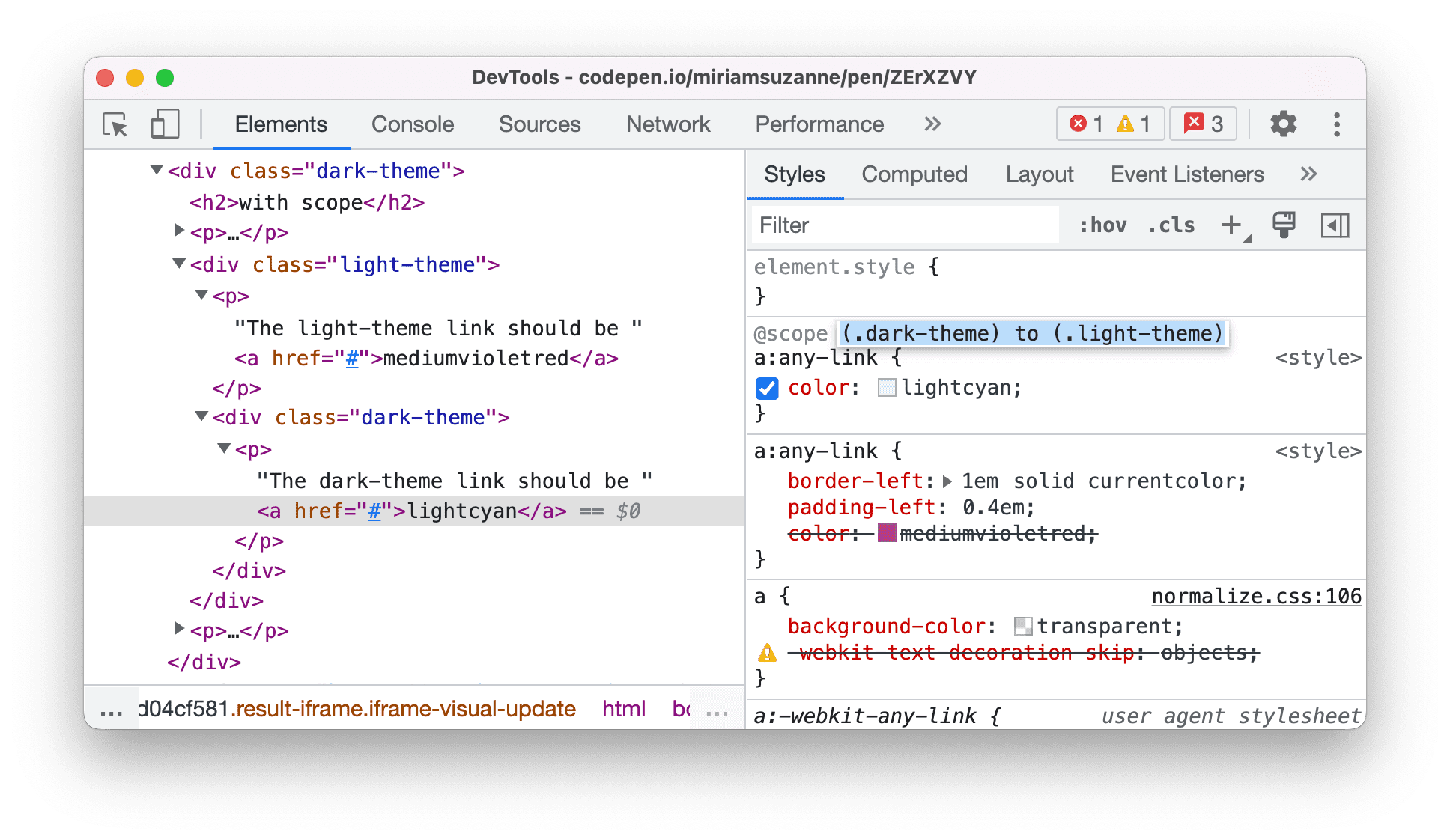
Chromium issue: 1337777
Source map improvements
Here are a few fixes on source maps to improve the overall debugging experience:
- DevTools now properly resolves source map identifiers with punctuation. Some modern minifiers (for example, esbuild) produce source maps that merge identifiers with subsequent punctuation (comma, parentheses, semicolon).
- DevTools now resolves source map names for constructors with a
supercall. - Fixed source map URL indexing for duplicate canonical URLs. Previously, breakpoints were not activated in some files because of duplicate canonical URLs.

Chromium issue: 1335338, 1333411
Miscellaneous highlights
These are some noteworthy fixes in this release:
- Properly remove a local storage key value pair from the table in the Application > Local Storage pane when it is deleted. (1339280)
- The color previews are now correctly displayed when viewing CSS files in the Sources panel. Previously, their positions were misplaced. (1340062)
- Consistently display the CSS flex and grid items in the Layout pane, as well as display them as badges in the Elements panel. Previously, the flex and grid items were randomly missing in both places. (1340441, 1273992)
- A new Creator Ad Script link is available for ad frames if DevTools found the script that caused the frame to be labeled as an ad. You can open a frame via Application > Frames. (1217041)
Download the preview channels
Consider using the Chrome Canary, Dev, or Beta as your default development browser. These preview channels give you access to the latest DevTools features, let you test cutting-edge web platform APIs, and help you find issues on your site before your users do!
Get in touch with the Chrome DevTools team
Use the following options to discuss the new features, updates, or anything else related to DevTools.
- Submit feedback and feature requests to us at crbug.com.
- Report a DevTools issue using the More options > Help > Report a DevTools issue in DevTools.
- Tweet at @ChromeDevTools.
- Leave comments on What's new in DevTools YouTube videos or DevTools Tips YouTube videos.
What's new in DevTools
A list of everything that has been covered in the What's new in DevTools series.
- DevTools MCP server updates
- Improved trace sharing
- Support for @starting-style
- Editor widget for display: masonry
- Lighthouse 13
- Code suggestions from Gemini
- Enhancements for the DevTools MCP server
- Quicker access to AI assistance
- Debug the full performance trace with Gemini
- Toggle drawer orientation
- Google Developer Program
- Miscellaneous highlights
- Chrome DevTools (MCP) for your AI agent
- Debug the network dependency tree with Gemini
- Export your chats with Gemini
- Persisted track configuration in the Performance panel
- Filter IP protected network requests
- Elements > Layout tab adds masonry layout support
- Lighthouse 12.8.2
- Miscellaneous highlights
- Debug more insights with Gemini
- Emulate the 'Save-Data' header in 'Network conditions'
- See the Baseline status in a CSS property tooltip
- Override form factors in user agent client hints
- Lighthouse 12.8.0
- Miscellaneous highlights
- A more reliable and productive Chrome DevTools
- Upload images in AI assistance for styling
- Add request headers to the table in Network
- Check out the highlights from Google I/O 2025
- Miscellaneous highlights
- Performance panel improvements
- Preconnected origins in 'Network dependency tree' insight
- Server response and redirection times in 'Document request latency' insight
- Redirects in Summary of network requests
- Reduced noise in the performance trace
- Deprecated 'Disable JavaScript samples'
- Geolocation accuracy parameter in Sensors
- Elements panel improvements
- Debug complex CSS values easier
- @function support in Elements > Styles
- Network panel improvements
- has-request-header filter
- Direct Sockets in Isolated Web Apps
- Miscellaneous highlights
- Accessibility
- Google I/O 2025 edition
- Modify and save CSS changes to your workspace with Gemini
- Connect a workspace folder and save changes back to your source files
- Ask Gemini about performance insights
- Annotate performance findings with Gemini
- Add screenshots to your chats with Gemini
- New insights in the Performance panel
- Duplicated JavaScript
- Legacy JavaScript
- Speculations now support rule tags
- Lighthouse 12.6.0
- Miscellaneous highlights
- Accessibility
- Performance panel improvements
- New performance insights
- Click to highlight
- Server timings in Summary of network requests
- Filter cookies in 'Privacy and security'
- Sizes in kB units in tables across panels
- Autocomplete supports corner-shape and corner-*-shape in Elements > Styles
- Experimental: Highlighting issues with elements and attributes in DOM
- Lighthouse 12.5.0
- Miscellaneous highlights
- Performance panel improvements
- Origin and script links for profile and function calls in Performance
- LCP by phase field data support
- Network dependency tree insight
- Duration instead of total and self time in Summary
- Heaviest stack highlighting
- Improved empty states for various panels
- Accessibility tree view in Elements
- Lighthouse 12.4.0
- Miscellaneous highlights
- Privacy and security panel
- Performance panel improvements
- Calibrated CPU throttling presets
- Select different performance events in the same AI chat
- First- and third-party highlighting in Performance
- Field data in marker tooltips and insights
- Forced reflow insight
- 'Optimize DOM size' insight
- Extend the performance trace with console.timeStamp
- Elements panel improvements
- Real-time values of animated styles
- Support for :open pseudo-class and various pseudo-elements
- Copy all console messages
- Byte units in the Memory panel
- Miscellaneous highlights
- Persistent AI chat history
- Performance panel improvements
- Image delivery insight
- Classic and modern keyboard navigation
- Ignore irrelevant scripts in the flame chart
- Timeline marker and range highlighting on hover
- Recommended throttling settings
- Timings markers in an overlay
- Stack traces of JS calls in Summary
- Badge settings moved to menu in Elements
- New 'What's new' panel
- Lighthouse 12.3.0
- Miscellaneous highlights
- Debug network requests, source files, and performance traces with Gemini
- View AI chat history
- Manage extension storage in Application > Storage
- Performance improvements
- Interaction phases in live metrics
- Render blocking information in the Summary tab
- Support for scheduler.postTask events and their initiator arrows
- Animations panel and Elements > Styles tab improvements
- Jump from Elements > Styles to Animations
- Real-time updates in Computed tab
- Compute pressure emulation in Sensors
- JS objects with the same name grouped by source in the Memory panel
- A new look for settings
- Performance insights panel is deprecated and removed from DevTools
- Miscellaneous highlights
- Debug CSS with Gemini
- Control AI features in a dedicated settings tab
- Performance panel improvements
- Annotate and share performance findings
- Get performance insights right in the Performance panel
- Spot excessive layout shifts easier
- Spot the non-composited animations
- Hardware concurrency moves to Sensors
- Ignore anonymous scripts and focus on your code in stack traces
- Elements > Styles: Support for sideways-* writing modes for grid overlays and CSS-wide keywords
- Lighthouse audits for non-HTTP pages in timespan and snapshot modes
- Accessibility improvements
- Miscellaneous highlights
- Network panel improvements
- Network filters reimagined
- HAR exports now exclude sensitive data by default
- Elements panel improvements
- Autocomplete values for text-emphasis-* properties
- Scroll overflows marked with a badge
- Performance panel improvements
- Recommendations in live metrics
- Navigate breadcrumbs
- Memory panel improvements
- New 'Detached elements' profile
- Improved naming of plain JS objects
- Turn off dynamic theming
- Chrome Experiment: Process sharing
- Lighthouse 12.2.1
- Miscellaneous highlights
- Recorder supports export to Puppeteer for Firefox
- Performance panel improvements
- Live metrics observations
- Search requests in the Network track
- See stack traces of performance.mark and performance.measure calls
- Use test address data in the Autofill panel
- Elements panel improvements
- Force more states for specific elements
- Elements > Styles now autocompletes more grid properties
- Lighthouse 12.2.0
- Miscellaneous highlights
- Console insights by Gemini are going live in most European countries
- Performance panel updates
- Enhanced Network track
- Customize performance data with extensibility API
- Details in the Timings track
- Copy all listed requests in the Network panel
- Faster heap snapshots with named HTML tags and less clutter
- Open Animations panel to capture animations and edit @keyframes live
- Lighthouse 12.1.0
- Accessibility improvements
- Miscellaneous highlights
- Inspect CSS anchor positioning in the Elements panel
- Sources panel improvements
- Enhanced 'Never Pause Here'
- New scroll snap event listeners
- Network panel improvements
- Updated network throttling presets
- Service worker information in custom fields of the HAR format
- Send and receive WebSocket events in the Performance panel
- Miscellaneous highlights
- Performance panel improvements
- Move and hide tracks with updated track configuration mode
- Ignore scripts in the flame chart
- Throttle down the CPU by 20 times
- Performance insights panel will be deprecated
- Find excessive memory usage with new filters in heap snapshots
- Inspect storage buckets in Application > Storage
- Disable self-XSS warnings with a command-line flag
- Lighthouse 12.0.0
- Miscellaneous highlights
- Understand errors and warnings in the Console better with Gemini
- @position-try rules support in Elements > Styles
- Sources panel improvements
- Configure automatic pretty-printing and bracket closing
- Handled rejected promises are recognized as caught
- Error causes in the Console
- Network panel improvements
- Inspect Early Hints headers
- Hide the Waterfall column
- Performance panel improvements
- Capture CSS selector statistics
- Change order and hide tracks
- Ignore retainers in the Memory panel
- Lighthouse 11.7.1
- Miscellaneous highlights
- New Autofill panel
- Enhanced network throttling for WebRTC
- Scroll-driven animations support in the Animations panel
- Improved CSS nesting support in Elements > Styles
- Enhanced Performance panel
- Hide functions and their children in the flame chart
- Arrows from selected initiators to events they initiated
- Lighthouse 11.6.0
- Tooltips for special categories in Memory > Heap snapshots
- Application > Storage updates
- Bytes used for shared storage
- Web SQL is fully deprecated
- Coverage panel improvements
- The Layers panel might be deprecated
- JavaScript Profiler deprecation: Phase four, final
- Miscellaneous highlights
- Find the Easter egg
- Elements panel updates
- Emulate a focused page in Elements > Styles
- Color Picker, Angle Clock, and Easing Editor in
var()fallbacks - CSS length tool is deprecated
- Popover for the selected search result in the Performance > Main track
- Network panel updates
- Clear button and search filter in the Network > EventStream tab
- Tooltips with exemption reasons for third-party cookies in Network > Cookies
- Enable and disable all breakpoints in Sources
- View loaded scripts in DevTools for Node.js
- Lighthouse 11.5.0
- Accessibility improvements
- Miscellaneous highlights
- The official collection of Recorder extensions is live
- Network improvements
- Failure reason in the Status column
- Improved Copy submenu
- Performance improvements
- Breadcrumbs in the Timeline
- Event initiators in the Main track
- JavaScript VM instance selector menu for Node.js DevTools
- New shortcut and command in Sources
- Elements improvements
- The ::view-transition pseudo-element is now editable in Styles
- The align-content property support for block containers
- Posture support for emulated foldable devices
- Dynamic theming
- Third-party cookies phaseout warnings in the Network and Application panels
- Lighthouse 11.4.0
- Accessibility improvements
- Miscellaneous highlights
- Elements improvements
- Streamlined filter bar in the Network panel
@font-palette-valuessupport- Supported case: Custom property as a fallback of another custom property
- Improved source map support
- Performance panel improvements
- Enhanced Interactions track
- Advanced filtering in Bottom-Up, Call Tree, and Event Log tabs
- Indentation markers in the Sources panel
- Helpful tooltips for overridden headers and content in the Network panel
- New Command Menu options for adding and removing request blocking patterns
- The CSP violations experiment is removed
- Lighthouse 11.3.0
- Accessibility improvements
- Miscellaneous highlights
- Third-party cookie phaseout
- Analyze your website's cookies with the Privacy Sandbox Analysis Tool
- Enhanced ignore listing
- Default exclusion pattern for node_modules
- Caught exceptions now stop execution if caught or passing through non-ignored code
x_google_ignoreListrenamed toignoreListin source maps- New input mode toggle during remote debugging
- The Elements panel now shows URLs for #document nodes
- Effective Content Security Policy in the Application panel
- Improved animation debugging
- 'Do you trust this code?' dialog in Sources and self-XSS warning in Console
- Event listener breakpoints in web workers and worklets
- The new media badge for
<audio>and<video> - Preloading renamed to Speculative loading
- Lighthouse 11.2.0
- Accessibility improvements
- Miscellaneous highlights
- Improved @property section in Elements > Styles
- Editable @property rule
- Issues with invalid @property rules are reported
- Updated list of devices to emulate
- Pretty-print inline JSON in script tags in Sources
- Autocomplete private fields in Console
- Lighthouse 11.1.0
- Accessibility improvements
- Web SQL deprecation
- Screenshot aspect ratio validation in Application > Manifest
- Miscellaneous highlights
- New section for custom properties in Elements > Styles
- More local overrides improvements
- Enhanced search
- Improved Sources panel
- Streamlined workspace in the Sources panel
- Reorder panes in Sources
- Syntax highlighting and pretty-printing for more script types
- Emulate prefers-reduced-transparency media feature
- Lighthouse 11
- Accessibility improvements
- Miscellaneous highlights
- Network panel improvements
- Override web content locally even faster
- Override the content of XHR and fetch requests
- Hide Chrome extension requests
- Human-readable HTTP status codes
Performance: See the changes in fetch priority for network events
- Sources settings enabled by default: Code folding and automatic file reveal
- Improved debugging of third-party cookie issues
- New colors
- Lighthouse 10.4.0
- Debug preloading in the Application panel
- The C/C++ WebAssembly debugging extension for DevTools is now open source
- Miscellaneous highlights
- (Experimental) New rendering emulation: prefers-reduced-transparency
- (Experimental) Enhanced Protocol monitor
- Improved debugging of missing stylesheets
- Linear timing support in Elements > Styles > Easing Editor
- Storage buckets support and metadata view
- Lighthouse 10.3.0
- Accessibility: Keyboard commands and improved screen reading
- Miscellaneous highlights
- Elements improvements
- New CSS subgrid badge
- Selector specificity in tooltips
- Values of custom CSS properties in tooltips
- Sources improvements
- CSS syntax highlighting
- Shortcut to set conditional breakpoints
- Application > Bounce Tracking Mitigations
- Lighthouse 10.2.0
- Ignore content scripts by default
- Network > Response improvements
- Miscellaneous highlights
- WebAssembly debugging support
- Improved stepping behavior in Wasm apps
- Debug Autofill using the Elements panel and Issues tab
- Assertions in Recorder
- Lighthouse 10.1.1
- Performance enhancements
- performance.mark() shows timing on hover in Performance > Timings
- profile() command populates Performance > Main
- Warning for slow user interactions
- Web Vitals updates
- JavaScript Profiler deprecation: Phase three
- Miscellaneous highlights
- Override network response headers
- Nuxt, Vite, and Rollup debugging improvements
- CSS improvements in Elements > Styles
- Invalid CSS properties and values
- Links to key frames in the animation shorthand property
- New Console setting: Autocomplete on Enter
- Command Menu emphasizes authored files