
New section for custom properties in Elements > Styles
The Elements panel now supports the @property CSS at-rule. It lets you define CSS custom properties explicitly and register them in a stylesheet without running any JavaScript.
To inspect your registered custom properties, in Elements > Styles, hover over the property name and see its descriptors in a tooltip. In the tooltip, click the link to view the registered property in the collapsible @property section.
Chromium issues: 1471102, 1471103, 1471105.
More local overrides improvements
Continuing the stream of improvements in the previous version, local overrides now do the following:
In Sources > Page, when you right-click a source-mapped file and select Override content, DevTools will show a dialog that takes you to the original source instead. Contents of source-mapped files can't be overridden.
The Network panel gets a new Has overrides column and a corresponding
has-overrides:[content|headers|yes|no]filter. To see the Has overrides column, right-click the table header and select it.In Sources > Overrides, the Delete all overrides menu option has been replaced with the Delete option with precise behavior.


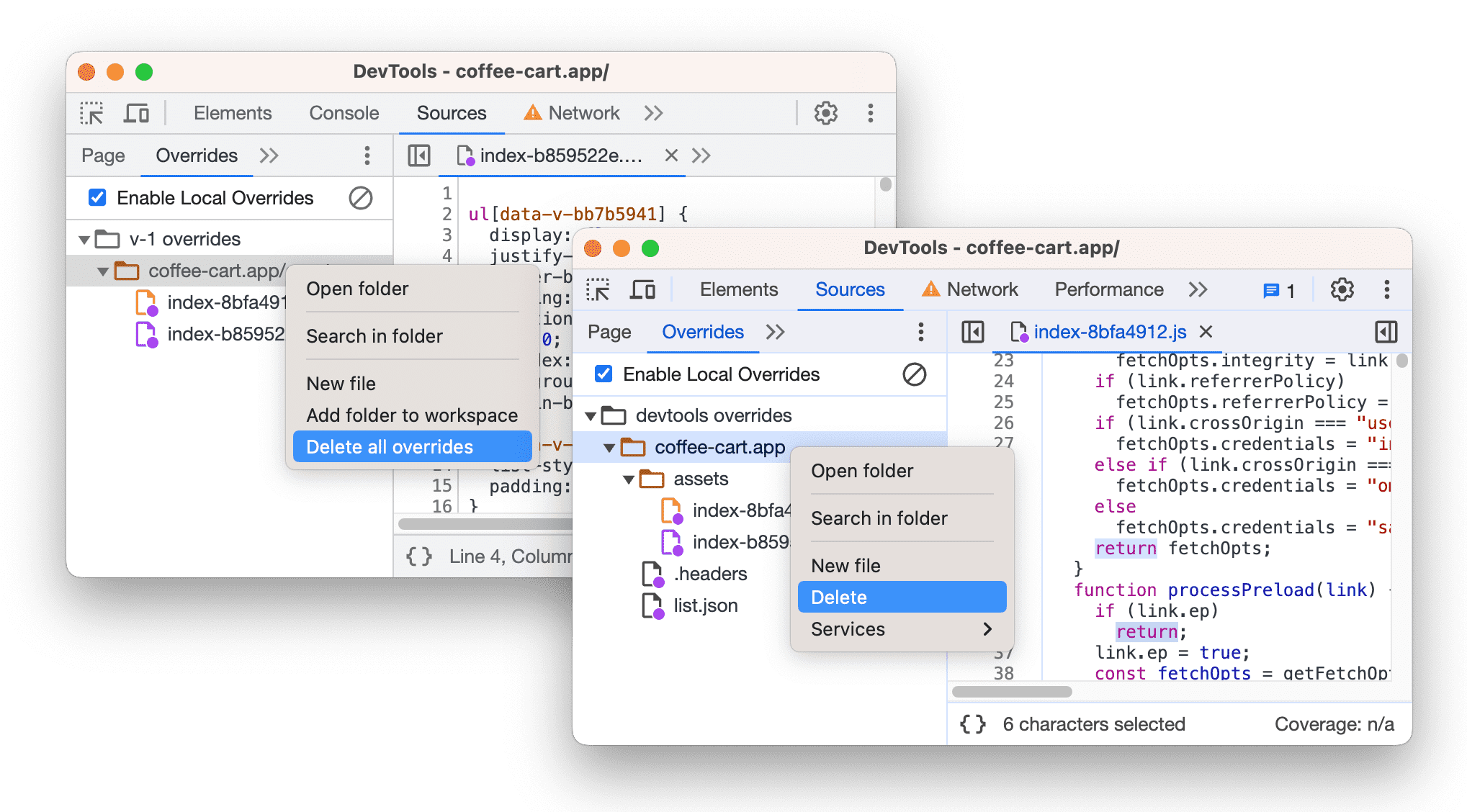
The previous Delete all overrides was confusing because it deleted only the overrides active in the current session, marked by the 
The new Delete option, first shows a warning message and prompts confirmation, then deletes the folder you clicked with all its contents.
To bring back the previous option, check Enable "Delete all overrides temporarily" in
Settings > Experiments.
Chromium issues: 1472952, 1416338, 1472580, 1473681 1475668.
Enhanced search
Search results now show an entry per all the matches it found in a line of code. Previously, it showed only the first match per line of code. The new behavior is especially useful when you search across minified files. When you click a search result, it opens the file in the editor and now scrolls the match into view not only vertically but also horizontally.

Additionally, Search got a speed boost. See the before (left) and after (right) comparison in the next video.
Finally, Search now supports ignore listing and won't show you results from ignored files.
Chromium issues: 1468875, 1472019.
Improved Sources panel
Streamlined workspace in the Sources panel
The workspace feature in the Sources panel is new streamlined:
- Consistent naming. Most notably, the Sources > Filesystem pane was renamed into Workspace. Various UI texts in this pane are now clearer and free of redundancy.
- Improved setup. See better cues for dragging and dropping folders or click a link to select a folder.
Sources > Workspace lets you sync changes you make in DevTools directly to your source files.
See the new setup and workflow in action:
Chromium issues: 1473771, 1473880, 1473963, 1474686, 1474687.
Reorder panes in Sources
You can now reorder panes on the left side of the Sources panel by dragging and dropping, similar to how you can reorder other panels, tabs, and panes.
Chromium issues: 1473758.
Syntax highlighting and pretty-printing for more script types
The Sources panel can now:
- Pretty-print inline JavaScript within the following script types:
module,importmap,speculationrules. - Highlight the syntax of
importmapandspeculationrulesscript types, both of which hold JSON.

For more information on speculation rules, see Prerender pages in Chrome for instant page navigations.
Chromium issue: 1473875.
Emulate prefers-reduced-transparency media feature
Chrome 118 now supports the prefers-reduced-transparency media feature. This feature lets developers adapt web content to user-selected preference for reduced transparency in the OS, such as the Reduce transparency setting on macOS.
To emulate this media feature, open the Rendering tab and scroll down to it.
Chromium issue: 1424879.
Lighthouse 11
The Lighthouse panel now runs Lighthouse 11. Most notably, this version removes legacy navigation and adds new accessibility audits and changes how the accessibility category is scored.
See also the full list of changes. To learn the basics of using the Lighthouse panel in DevTools, see Lighthouse: Optimize website speed.
Chromium issue: 772558.
Accessibility improvements
DevTools now supports more navigation keystrokes:
- CSS Overview: Use the up and down arrows to navigate sections in the left sidebar.
- Memory: In the left sidebar, focus the Save button next to snapshots with Tab and press Enter to select folder.
Additionally, several screen reader announcement issues have been fixed.
Chromium issues: 1470401, 1471301, 1474108, 1468631.
Miscellaneous highlights
These are some noteworthy fixes and improvements in this release:
- Network: New icons for popular resources types:
media,wasm,websocket,manifest,fetch/xhr,json(1466298). - Color updates to material 3 colors in many UI elements, most notably in the Elements and Performance panels (1456690, 1472243).
- Issues now preserves cookie issues across navigations (1466601).
- Various Application > Preloading improvements, most notably sortable grids and revised rule set details (1410709).
- Various improvements of the command editor in Protocol monitor, most notably warnings on wrong input, editing a sent command, editor for object parameters without predefined keys, support for enums undefined by references, objects without type reference, filter commands by substring matches, and more (1448050).
- Performance flame chart gets a border around the total box on the pie chart (1470147).
- Sources now doesn't treat dashes as word characters in CSS (1471354).
- Autocomplete now always sorts CSS-wise keywords at the end.
- RegEx filters now support spaces (1346936).
- Elements fixed media query feature detection (1472693).
Download the preview channels
Consider using the Chrome Canary, Dev, or Beta as your default development browser. These preview channels give you access to the latest DevTools features, let you test cutting-edge web platform APIs, and help you find issues on your site before your users do!
Get in touch with the Chrome DevTools team
Use the following options to discuss the new features, updates, or anything else related to DevTools.
- Submit feedback and feature requests to us at crbug.com.
- Report a DevTools issue using the More options > Help > Report a DevTools issue in DevTools.
- Tweet at @ChromeDevTools.
- Leave comments on What's new in DevTools YouTube videos or DevTools Tips YouTube videos.
What's new in DevTools
A list of everything that has been covered in the What's new in DevTools series.
- DevTools MCP server updates
- Improved trace sharing
- Support for @starting-style
- Editor widget for display: masonry
- Lighthouse 13
- Code suggestions from Gemini
- Enhancements for the DevTools MCP server
- Quicker access to AI assistance
- Debug the full performance trace with Gemini
- Toggle drawer orientation
- Google Developer Program
- Miscellaneous highlights
- Chrome DevTools (MCP) for your AI agent
- Debug the network dependency tree with Gemini
- Export your chats with Gemini
- Persisted track configuration in the Performance panel
- Filter IP protected network requests
- Elements > Layout tab adds masonry layout support
- Lighthouse 12.8.2
- Miscellaneous highlights
- Debug more insights with Gemini
- Emulate the 'Save-Data' header in 'Network conditions'
- See the Baseline status in a CSS property tooltip
- Override form factors in user agent client hints
- Lighthouse 12.8.0
- Miscellaneous highlights
- A more reliable and productive Chrome DevTools
- Upload images in AI assistance for styling
- Add request headers to the table in Network
- Check out the highlights from Google I/O 2025
- Miscellaneous highlights
- Performance panel improvements
- Preconnected origins in 'Network dependency tree' insight
- Server response and redirection times in 'Document request latency' insight
- Redirects in Summary of network requests
- Reduced noise in the performance trace
- Deprecated 'Disable JavaScript samples'
- Geolocation accuracy parameter in Sensors
- Elements panel improvements
- Debug complex CSS values easier
- @function support in Elements > Styles
- Network panel improvements
- has-request-header filter
- Direct Sockets in Isolated Web Apps
- Miscellaneous highlights
- Accessibility
- Google I/O 2025 edition
- Modify and save CSS changes to your workspace with Gemini