



A security sandbox tool that controls network and file access for processes using eBPF on Linux and sandbox-exec on macOS.
- Cross-platform: Works on both Linux (eBPF) and macOS (sandbox-exec)
- Network Access Control:
- Linux: Full support for domain names, IP addresses, and CIDR ranges
- macOS: All-or-nothing network control only (allow all or deny all network access)
- File Access Control: Restrict file system access to specific directories and files
- Configuration File Support: Define policies in TOML format for reusable configurations
For detailed development guide and troubleshooting, see docs/development_guide.md.
Prerequisites:
- Rust 1.90 or later (specified in
rust-toolchain.toml) - On Linux: BPF tools and nightly toolchain with rust-src
Linux Setup:
- Linux: Root privileges required for eBPF and cgroup operations (CAP_BPF, CAP_SYS_ADMIN, CAP_NET_ADMIN)
- cgroup v2: Must be mounted at
/sys/fs/cgroup - BPF LSM: Kernel must have
CONFIG_BPF_LSM=yandbpfin/sys/kernel/security/lsm
# Install BPF dependencies (Ubuntu/Debian)
sudo apt-get install -y libbpf-dev linux-tools-common linux-tools-$(uname -r)

# Install Rust nightly toolchain with BPF target
rustup toolchain install nightly-x86_64-unknown-linux-gnu --profile minimal --component rust-src

# Install bpf-linker
cargo install bpf-linker

# Build mori
cargo build --release
macOS Setup:
# Build (eBPF components are skipped on macOS)
cargo build --release
The compiled binary will be available at ./target/release/mori.
Download pre-built binaries from the Releases page.
Note for Linux: Pre-built Linux binaries are built against a specific kernel version and may not work on different kernel versions due to eBPF compatibility. The kernel version is included in the binary filename (e.g.,
mori-x86_64-unknown-linux-gnu-kernel-6.8.0). If the binary doesn't work on your system, please build from source.
Note: On Linux,
sudois required for eBPF and cgroup operations. On macOS,sudois not required as sandbox-exec does not need elevated privileges.Linux Tip: To preserve environment variables and PATH when using
sudo, usesudo -E env "PATH=$PATH" mori ...
Allow network access only to specific domains (Linux only):
# Allow access to example.com
mori --allow-network example.com -- curl https://example.com

# Allow multiple domains
mori --allow-network example.com,github.com -- your-command

# Allow specific IP addresses
mori --allow-network 192.168.1.1 -- your-command

# Allow CIDR ranges
mori --allow-network 10.0.0.0/24 -- your-command

# Allow all network access (both Linux and macOS)
mori --allow-network-all -- your-commandDeny access to specific files or directories:
# Deny all access (read/write) to a file
mori --deny-file /etc/passwd -- your-command

# Deny read access to specific files
mori --deny-file-read /etc/shadow,/root/.ssh -- your-command

# Deny write access to specific directories
mori --deny-file-write /var/log,/tmp -- your-command

# Combine multiple file restrictions
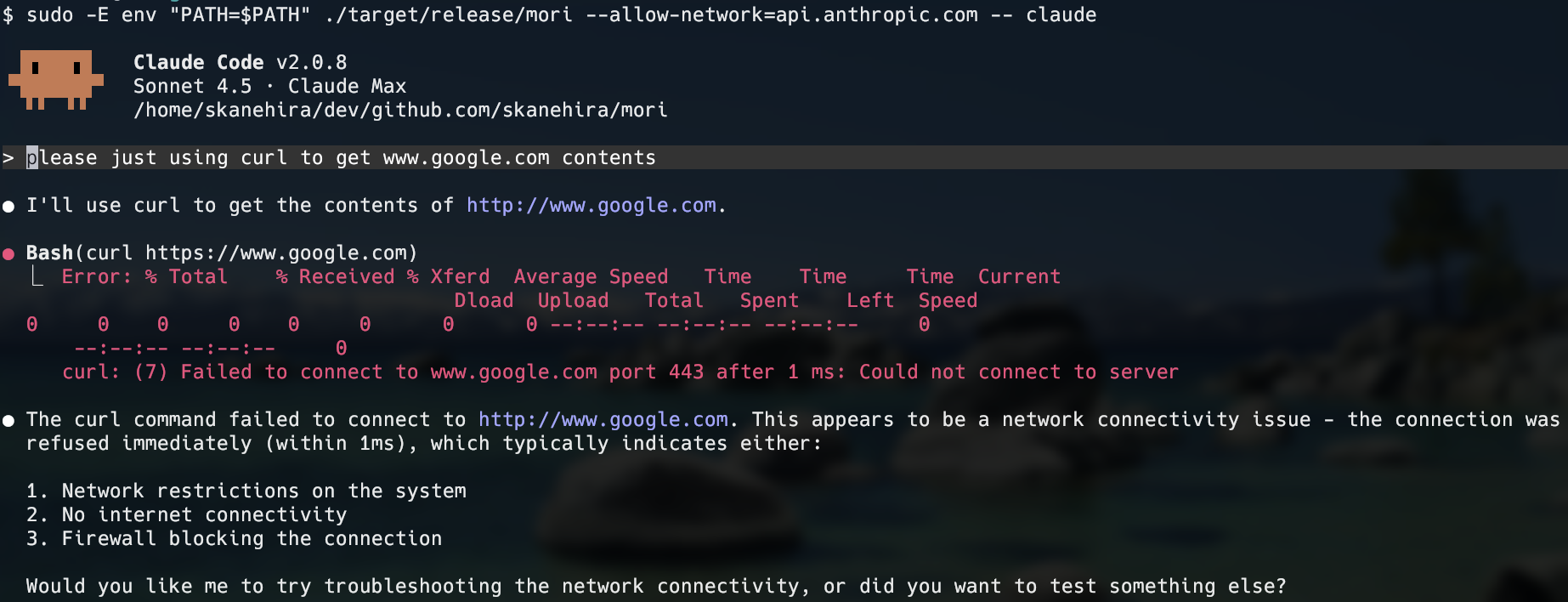
mori --deny-file /etc/passwd --deny-file-write /var -- your-commandRestrict Claude Code to only access Anthropic's API:
# Linux (preserving PATH for the claude command)
sudo -E env "PATH=$PATH" mori --allow-network api.anthropic.com -- claudeCreate a TOML configuration file with all available options:
# mori.toml - Complete configuration example

[network]
# Network access control
# Option 1: Allow all network access
# allow = true

# Option 2: Deny all network access (default)
# allow = false

# Option 3: Allow specific destinations (Linux only)
# Supports domain names, IP addresses, and CIDR ranges
allow = [
  "example.com",          # Domain name
  "192.168.1.1",          # Single IP address
  "10.0.0.0/24",          # CIDR range
  "8.8.8.8"               # Google DNS
]

[file]
# Deny both read and write access to these paths
deny = [
  "/etc/passwd",
  "/tmp/secret"
]

# Deny read-only access to these paths
deny_read = [
  "/home/user/.ssh",
  "/etc/shadow"
]

# Deny write-only access to these paths
deny_write = [
  "/var/log",
  "/etc/systemd"
]
Run with the configuration:
sudo mori --config mori.toml -- your-commandNote: CLI arguments take precedence over configuration file settings.
While "mori(杜)" literally means "a cluster of trees," in Japanese cultural context it most commonly refers to shrine forests—the sacred groves that surround shrine grounds. This has evolved to convey the idea of "forests as a sacred boundary or barrier."
-
Forests as sacred domains Shrine guardian forests are regarded as "natural boundaries" that separate the mundane world from the divine realm. The transition from the secular to the sacred is symbolized by crossing the torii gate into the forest.
-
Mori(杜) as symbolic barriers These aren't mere woodlands but "preserved spaces dedicated to divine worship." They represent sanctified areas isolated from the outside world.
We chose the name "mori(杜)" to evoke the image of a specially protected domain—a sandbox-like boundary shielded from the outside world.