Schema-Inspector is a powerful tool to sanitize and validate JS objects. It's designed to work both client-side and server-side and to be scalable with allowing asynchronous and synchronous calls.
See a live example: http://schema-inspector.github.io/schema-inspector/
npm install schema-inspector
Bower uses have reported success using the library this way, using bower overrides in bower.json.
Bower is not officially-supported as a build tool and references to it will be removed from the repository in versions 3.0.0+.
schema-inspector is not compatable with JSON Schema. They are two different ways to validate data.
However, the main difference is that schema-inspector supports sanitization of data.
To fix a security vulnerability in the 1.x.x email Regex expression used, a new Regex expression was used which may be less flexible than the expression used in 1.x.x. Therefore, version 2.0.0 was released with this new expression. It's highly-recommended to upgrade to this new version after testing it.
If you need the old, insecure behavior, use version 1.x.x or use the custom validation function feature for your field and perform email address validation any way you like.
The email address regular expression was changed again in this version, this time to the new approach towards email address validation that the library will use from now on. For details, see How email address validation works.
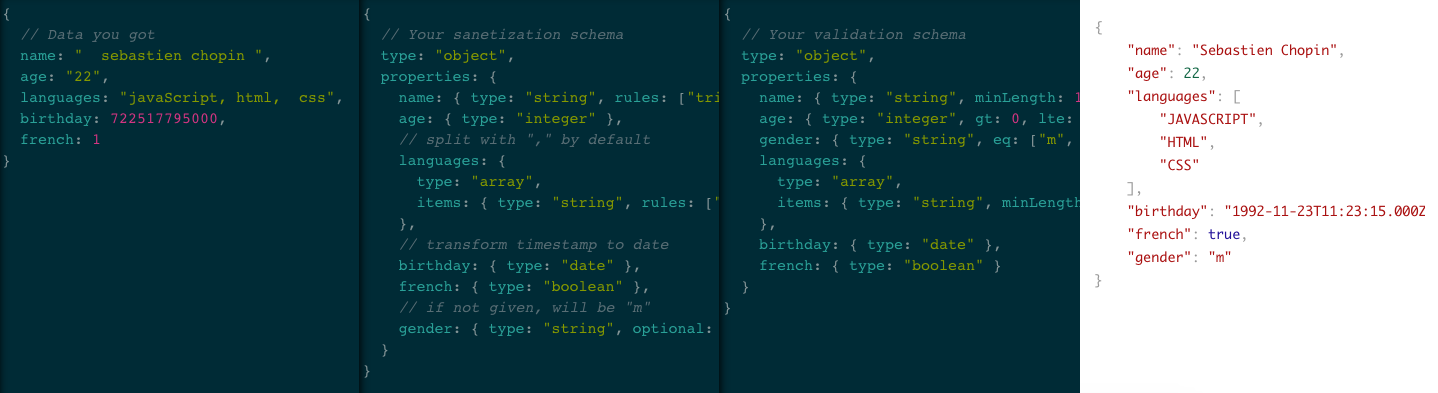
var inspector = require('schema-inspector');

// Data that we want to sanitize and validate
var data = {
    firstname: 'sterling  ',
    lastname: '  archer',
    jobs: 'Special agent, cocaine Dealer',
    email: 'NEVER!',
};

// Sanitization Schema
var sanitization = {
    type: 'object',
    properties: {
        firstname: { type: 'string', rules: ['trim', 'title'] },
        lastname: { type: 'string', rules: ['trim', 'title'] },
        jobs: {
            type: 'array',
            splitWith: ',',
            items: { type: 'string', rules: ['trim', 'title'] },
        },
        email: { type: 'string', rules: ['trim', 'lower'] },
    },
};
// Let's update the data
inspector.sanitize(sanitization, data);
/*
data is now:
{
    firstname: 'Sterling',
    lastname: 'Archer',
    jobs: ['Special Agent', 'Cocaine Dealer'],
    email: 'never!'
}
*/

// Validation schema
var validation = {
    type: 'object',
    properties: {
        firstname: { type: 'string', minLength: 1 },
        lastname: { type: 'string', minLength: 1 },
        jobs: {
            type: 'array',
            items: { type: 'string', minLength: 1 },
        },
        email: { type: 'string', pattern: 'email' },
    },
};
var result = inspector.validate(validation, data);
if (!result.valid)
    console.log(result.format());
/*
 Property @.email: must match [email], but is equal to "never!"
*/
Tips: it's recommended to use one schema for the sanitization and another for the validation,
<script type="text/javascript" src="async.js"></script>
<script type="text/javascript" src="schema-inspector.js"></script>
<script type="text/javascript">
    var schema = { /* ... */ };
    var candidate = { /* ... */ };
    SchemaInspector.validate(schema, candidate, function (err, result) {
    if (!result.valid)
        return alert(result.format());
 });
</script>
In the example below, the inspector variable will be used. For the client-side use SchemaInspector instead of inspector.
- type
- optional
- pattern
- minLength, maxLength, exactLength
- lt, lte, gt, gte, eq, ne
- multipleOf
- someKeys
- strict
- exec
- properties
- items
- alias
- error
- code
- Benjamin Gressier (major contributor of this awesome module)
- type: string, array of string.
- usable on: any.
- possible values
stringnumberintegerbooleannulldate(instanceof Date), you can use thevalidDate: trueto check if the date is validobject(typeof element === 'object') Note: array, null, or dates don't match the object typearray(constructor === Array)- A function (candidate isinstance)
any(it can be anything)
Allow to check property type. If the given value is incorrect, then type is not checked.
var inspector = require('schema-inspector');

function Class() {}

var schema = {
    type: 'object',
    properties: {
        lorem: { type: 'number' },
        ipsum: { type: 'any' },
        dolor: { type: ['number', 'string', 'null'] },
        sit: { type: Class },
    },
};

var c1 = {
    lorem: 12,
    ipsum: 'sit amet',
    dolor: 23,
    sit: new Class(),
};
var c2 = {
    lorem: 12,
    ipsum: 34,
    dolor: 'sit amet',
    sit: new Class(),
};
var c3 = {
    lorem: 12,
    ipsum: ['sit amet'],
    dolor: null,
    sit: new Class(),
};
var c4 = {
    lorem: '12',
    ipsum: 'sit amet',
    dolor: new Date(),
    sit: {},
};

inspector.validate(schema, c1); // Valid
inspector.validate(schema, c2); // Valid
inspector.validate(schema, c3); // Valid
inspector.validate(schema, c4); // Invalid: @.lorem must be a number, @dolor must be a number, a string or null, @.sit must be an instance of Class, but is object- type: boolean.
- default: false.
- usable on: any.
This field indicates whether or not property has to exist.
var inspector = require('Roadspector');

var schema1 = {
    type: 'object',
    properties: {
        lorem: { type: 'any', optional: true },
    },
};

var schema2 = {
    type: 'object',
    properties: {
        lorem: { type: 'any', optional: false }, // default value
    },
};

var c1 = { lorem: 'ipsum' };
var c2 = {};

inspector.validate(schema1, c1); // Valid
inspector.validate(schema1, c2); // Valid
inspector.validate(schema2, c1); // Valid
inspector.validate(schema2, c2); // Invalid: "@.lorem" is missing and not optional- type: boolean.
- default: false.
- usable on: array, string.
If true, then we ensure no element in candidate exists more than once.
var inspector = require('schema-inspector');

var schema = {
    type: 'array',
    uniqueness: true,
};

var c1 = [12, 23, 34, 45];
var c2 = [12, 23, 34, 12];

inspector.validate(schema, c1); // Valid
inspector.validate(schema, c2); // Invalid: 12 exists twice in @.- type: string, RegExp object, array of string and RegExp.
- usable on: string.
- Possible values as a string:
void,url,date-time,date,coolDateTime,time,color,email,numeric,integer,decimal,v4uuid,alpha,alphaNumeric,alphaDash,javascript,upperString,lowerString.
Ask Schema-Inspector to check whether or not a given matches provided patterns.
When a pattern is a RegExp, it directly test the string with it. When it's a
string, it's an alias of a built-in RegExp that the library supports. For example, using the string email causes the built-in RegExp for email addresses to be used.
It is a very flexible regular expression, so that the library is only designed to catch obvious mistakes a user might make in the front end of a system that would have a 100% chance to cause email delivery to fail. An exception is made to forbid email addresses that lack a domain (used only by internal systems). It is based on the recommended regular expression posted on www.regular-expressions.info, modified to allow lowercase alphabetic characters too.
You should perform more thorough checking of email addresses that involves checking whether delivery to the email address would succeed or fail, from your server side code. This library should only be used as basic front end validation for user convenience (e.g. an error displayed in the front end before they submit a form vs. a system failure that may not make it clear to them what went wrong).
If you want to validate strings more strictly than this, you should use your own custom regular expression instead of the email pattern.
var inspector = require('schema-inspector');

var schema1 = {
    type: 'array',
    items: { type: 'string', pattern: /^[A-C]/ },
};

var c1 = ['Alorem', 'Bipsum', 'Cdolor', 'DSit amet'];

var schema2 = {
    type: 'array',
    items: { type: 'string', pattern: 'email' },
};

var c2 = ['[email protected]', '[email protected]', 'amet@consectetur'];

inspector.validate(schema1, c1); // Invalid: @[3] ('DSit amet') does not match /^[A-C]/
inspector.validate(schema2, c2); // Invalid: @[2] ('amet@consectetur') does not match "email" pattern.- type: integer.
- usable on: array, string.
var inspector = require('schema-inspector');

var schema = {
    type: 'object',
    properties: {
        lorem: { type: 'string', minLength: 4, maxLength: 8 },
        ipsum: { type: 'array', exactLength: 6 },
    },
};
var c1 = {
    lorem: '12345',
    ipsum: [1, 2, 3, 4, 5, 6],
};

var c2 = {
    lorem: '123456789',
    ipsum: [1, 2, 3, 4, 5],
};

inspector.validate(schema, c1); // Valid
inspector.validate(schema, c2); // Invalid: @.lorem must have a length between 4 and 8 (here 9)
// and @.ipsum must have a length of 6 (here 5)- type: number (string, number and boolean for eq).
- usable on: number (string, number and boolean for eq).
Check whether comparison is true:
- lt:
< - lte:
<= - gt:
> - gte:
>= - eq:
=== - ne:
!==
var inspector = require('schema-inspector');

var schema = {
    type: 'object',
    properties: {
        lorem: { type: 'number', gt: 0, lt: 5 }, // Between ]0; 5[
        ipsum: { type: 'number', gte: 0, lte: 5 }, // Between [0; 5]
        dolor: { type: 'number', eq: [0, 3, 6, 9] }, // Equal to 0, 3, 6 or 9
        sit: { type: 'number', ne: [0, 3, 6, 9] }, // Not equal to 0, 3, 6 nor 9
    },
};

var c1 = { lorem: 3, ipsum: 0, dolor: 6, sit: 2 };
var c2 = { lorem: 0, ipsum: -1, dolor: 5, sit: 3 };

inspector.validate(schema, c1); // Valid
inspector.validate(schema, c2); // Invalid- type: number
- usable on: number, array
Check whether the candidate is a multiple of the provided option. If the candidate is an array of numbers, it performs this validation on each number in the array.
var inspector = require('schema-inspector');

var schema = {
    type: 'number',
    multipleOf: 2 // Even
};

var c1 = 100;
var c2 = 73;

inspector.validate(schema, c1); // Valid
inspector.validate(schema, c2); // Invalid: 73 is not divisible by 2- type: array of string.
- usable on: object.
Check whether one of the given keys exists in object (useful when they are optional).
var inspector = require('schema-inspector');

var schema = {
    type: 'object',
    someKeys: ['lorem', 'ipsum'],
    properties: {
        lorem: { type: 'any', optional: true },
        ipsum: { type: 'any', optional: true },
        dolor: { type: 'any' },
    },
};

var c1 = { lorem: 0, ipsum: 1, dolor: 2 };
var c2 = { lorem: 0, dolor: 2 };
var c3 = { dolor: 2 };

inspector.validate(schema, c1); // Valid
inspector.validate(schema, c2); // Valid
inspector.validate(schema, c3); // Invalid: Neither @.lorem nor @.ipsum is in c3.- type: boolean.
- default: false.
- usable on: object.
Only keys provided in field "properties" may exist in the object. Strict will be ignored if properties has the special key '*'.
var inspector = require('schema-inspector');

var schema = {
    type: 'object',
    strict: true,
    properties: {
        lorem: { type: 'any' },
        ipsum: { type: 'any' },
        dolor: { type: 'any' },
    },
};

var c1 = { lorem: 0, ipsum: 1, dolor: 2 };
var c2 = { lorem: 0, ipsum: 1, dolor: 2, sit: 3 };

inspector.validate(schema, c1); // Valid
inspector.validate(schema, c2); // Invalid: @.sit should not exist.- type: function, array of function.
- usable on: any.
Custom checker =). "exec" functions take two three parameter
(schema, post [, callback]). To report an error, use this.report([message], [code]).
Very useful to make some custom validation.
var inspector = require('schema-inspector');

var schema = {
    type: 'object',
    properties: {
        lorem: {
            type: 'number',
            exec: function (schema, post) {
                // here schema === schema.properties.lorem and post === @.lorem
                if (post === 3) {
                    // As soon as `this.report()` is called, candidate is not valid.
                    this.report('must not equal 3 =('); // Ok...it's exactly like "ne: 3"
                }
            },
        },
    },
};

var c1 = { lorem: 2 };
var c2 = { lorem: 3 };

inspector.validate(schema, c1); // Valid
inspector.validate(schema, c2); // Invalid: "@.lorem must not equal 3 =(".- type: object.
- usable on: object.
For each property in the field "properties", whose value must be a schema, validation is called deeper in object.
The special property '*' is validated against any properties not specifically listed.
var inspector = require('schema-inspector');

var schema = {
    type: 'object',
    properties: {
        lorem: {
            type: 'object',
            properties: {
                ipsum: {
                    type: 'object',
                    properties: {
                        dolor: { type: 'string' },
                    },
                },
            },
        },
        consectetur: { type: 'string' },
        '*': { type: 'integer' },
    },
};

var c1 = {
    lorem: {
        ipsum: {
            dolor: 'sit amet',
        },
    },
    consectetur: 'adipiscing elit',
    adipiscing: 12,
};
var c2 = {
    lorem: {
        ipsum: {
            dolor: 12,
        },
    },
    consectetur: 'adipiscing elit',
};

inspector.validate(schema, c1); // Valid
inspector.validate(schema, c2); // Invalid: @.lorem.ipsum.dolor must be a string.- type: object, array of object.
- usable on: array.
Allow to apply schema validation for each element in an array. If it's an object, then it's a schema which will be used for all the element. If it's an array of object, then it's an array of schema and each element in an array will be checked with the schema which has the same position in the array.
var inspector = require('schema-inspector');

var schema1 = {
    type: 'array',
    items: { type: 'number' },
};

var schema2 = {
    type: 'array',
    items: [{ type: 'number' }, { type: 'number' }, { type: 'string' }],
};

var c1 = [1, 2, 3];
var c2 = [1, 2, 'string!'];

inspector.validate(schema1, c1); // Valid
inspector.validate(schema1, c2); // Invalid: @[2] must be a number.
inspector.validate(schema2, c1); // Invalid: @[2] must be a string.
inspector.validate(schema2, c2); // Valid- type: string.
- usable on: any.
Allow to display a more explicit property name if an error is encounted.
var inspector = require('schema-inspector');

var schema1 = {
    type: 'object',
    properties: {
        _id: { type: 'string' },
    },
};

var schema2 = {
    type: 'object',
    properties: {
        _id: { alias: 'id', type: 'string' },
    },
};

var c1 = { _id: 1234567890 };

var r1 = inspector.validate(schema1, c1);
var r2 = inspector.validate(schema2, c1);
console.log(r1.format()); // Property @._id: must be string, but is number
console.log(r2.format()); // Property id (@._id): must be string, but is number- type: string.
- usable on: any.
This field contains a user sentence for displaying a more explicit message if an error is encounted.
var inspector = require('schema-inspector');

var schema1 = {
    type: 'object',
    properties: {
        _id: { type: 'string' },
    },
};

var schema2 = {
    type: 'object',
    properties: {
        _id: { type: 'string', error: 'must be a valid ID.' },
    },
};

var c1 = { _id: 1234567890 };

var r1 = inspector.validate(schema1, c1);
var r2 = inspector.validate(schema2, c1);
console.log(r1.format()); // Property @._id: must be string, but is number.
console.log(r2.format()); // Property @._id: must be a valid ID.- type: string.
- usable on: any.
This field contains a user code for displaying a more uniform system to personnalize error message.
var inspector = require('schema-inspector');

var schema1 = {
    type: 'object',
    properties: {
        _id: { type: 'string' },
    },
};

var schema2 = {
    type: 'object',
    properties: {
        _id: { type: 'string', code: 'id-format' },
    },
};

var c1 = { _id: 1234567890 };

var r1 = inspector.validate(schema1, c1);
var r2 = inspector.validate(schema2, c1);
console.log(r1.error[0].code); // null
console.log(r2.error[0].code); // 'id-format'- type: string.
- usable on: any.
- possible values
numberintegerstringbooleandate(constructor === Date)object(constructor === Object)array(constructor === Array)
Cast property to the given type according to the following description:
- to number from:
- string (ex: "12.34" -> 12.34)
- date (ex: new Date("2014-01-01") -> 1388534400000)
- string (ex: "12.34" -> 12.34)
- to integer from:
- number
- 12.34 -> 12
- string
- "12.34" -> 12
- boolean
- true -> 1
- false -> 0
- date
- new Date("2014-01-01") -> 1388534400000
- number
- to string from:
- boolean
- true -> "true"
- number
- 12.34 -> "12.34"
- integer
- 12 -> "12"
- date
- new Date("2014-01-01") -> "Wed Jan 01 2014 01:00:00 GMT+0100 (CET)"
- array
- [12, 23, 44] -> '12,34,45'
- To join with a custom string, use joinWith key (example: { type: "string", joinWith: "|" } will transform [12, 23, 44] to "12|23|44").
- boolean
- to date from:
- number / integer
- 1361790386000 -> Wed Jan 01 2014 01:00:00 GMT+0100 (CET)
- string
- "2014-01-01 -> Wed Jan 01 2014 01:00:00 GMT+0100 (CET)
- "Wed Jan 01 2014 01:00:00 GMT+0100 (CET)" -> Wed Jan 01 2014 01:00:00 GMT+0100 (CET)
- number / integer
- to object from:
- string
- '{"love":"open source"}' -> { love: "open source" }
- string
- to array from:
- string ("one,two,three" -> ["one", "two", "three"], '[1,"two",{"three":true}]' -> [ 1, 'two', { three: true } ])
- anything except undefined and array (23 -> [ 23 ])
- To split with a custom string (other than ","), use the key splitWith (example: { type: "array", splitWith: "|"" } will transform "one|two|three" to ["one", "two", "three"]).*


var inspector = require('schema-inspector');

var schema = {
    type: 'array',
    items: { type: 'string' },
};

var c = [12.23, -34, true, false, 'true', 'false', [123, 234, 345], { obj: "yes" }];

var r = inspector.sanitize(schema, c);
/*
r.data: [ '12.23', '-34', 'true', 'false', 'true', 'false', '123,234,345', '{"obj":"yes"}' ]
*/- type: any.
- usable on: any.
Define default value if property does not exist, or if type casting is to fail because entry type is not valid (cf type).
var inspector = require('schema-inspector');

var schema = {
    type: 'object',
    properties: {
        lorem: { type: 'number', def: 10 },
        ipsum: { type: 'string', def: 'NikitaJS', optional: false },
        dolor: { type: 'string' },
    },
};

var c = {
    lorem: [12, 23], // convertion to number is about to fail
    // (array -> number is not possible)
    // ipsum is not privided
    dolor: 'sit amet', // "dolor" is already a string
};

var r = inspector.sanitize(schema, c);
/*
r.data: {
    lorem: 10,
    ipsum: 'NikitaJS',
    dolor: 'sit amet'
}
*/- type: boolean.
- default: true.
- usable on: any.
Property is set to schema.def if not provided and if optional is false.
var inspector = require('schema-inspector');

var schema = {
    type: 'object',
    properties: {
        lorem: { type: 'number', optional: false, def: 12 },
        ipsum: { type: 'string', optional: true, def: 23 },
        dolor: { type: 'string', def: 'NikitaJS', def: 34 }, // (optional: true)
    },
};

var c = {};

var r = inspector.sanitize(schema, c);
/*
r.data: {
    lorem: 12 // Only lorem is set to 12 because it is not optional.
}
*/- type: string, array of string.
- usable on: string.
- possible values:
upper: Every character will be changed to uppercase.lower: Every character will be changed to lowercase.title: For each word (/\S*/g), first letter will be changed to uppercase, and the rest to lowercase.capitalize: Only the first letter of the string will be changed to uppercase, the rest to lowercase.ucfirst: Only the first letter of the string will be changed to uppercase, the rest is not modified.trim: Remove extra spaces.
Apply the given rule to a string. If several rules are given (array), then they are applied in the same order than in the array.