## Description The **active page** highlight color doesn't work when using the color by default by not declaring the `palette` configuration. You are required to declare the palette colors for active page to work. ### Expected behavior The active page highlight should work when not explicitly declaring the palette. It should use the colors by default.  ### Actual behavior The active page highlight doesn't work when not explicitly declaring the palette. 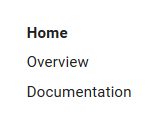 ### Steps to reproduce the bug 1. Create any MkDocs website using material theme 2. Do not set the palette 3. Run `mkdocs serve` and see the active link not being highlighted ### Package versions * Python: Python 3.6.1 * MkDocs: mkdocs, version 0.17.2 * Material: Version: 2.6.0 ### Project configuration Just remove the `palette` configuration from the `mkdocs.yml` ### System information * OS: Windows 10 * Browser: Chrome, Firefox, Edge